Controller Tuning GUI
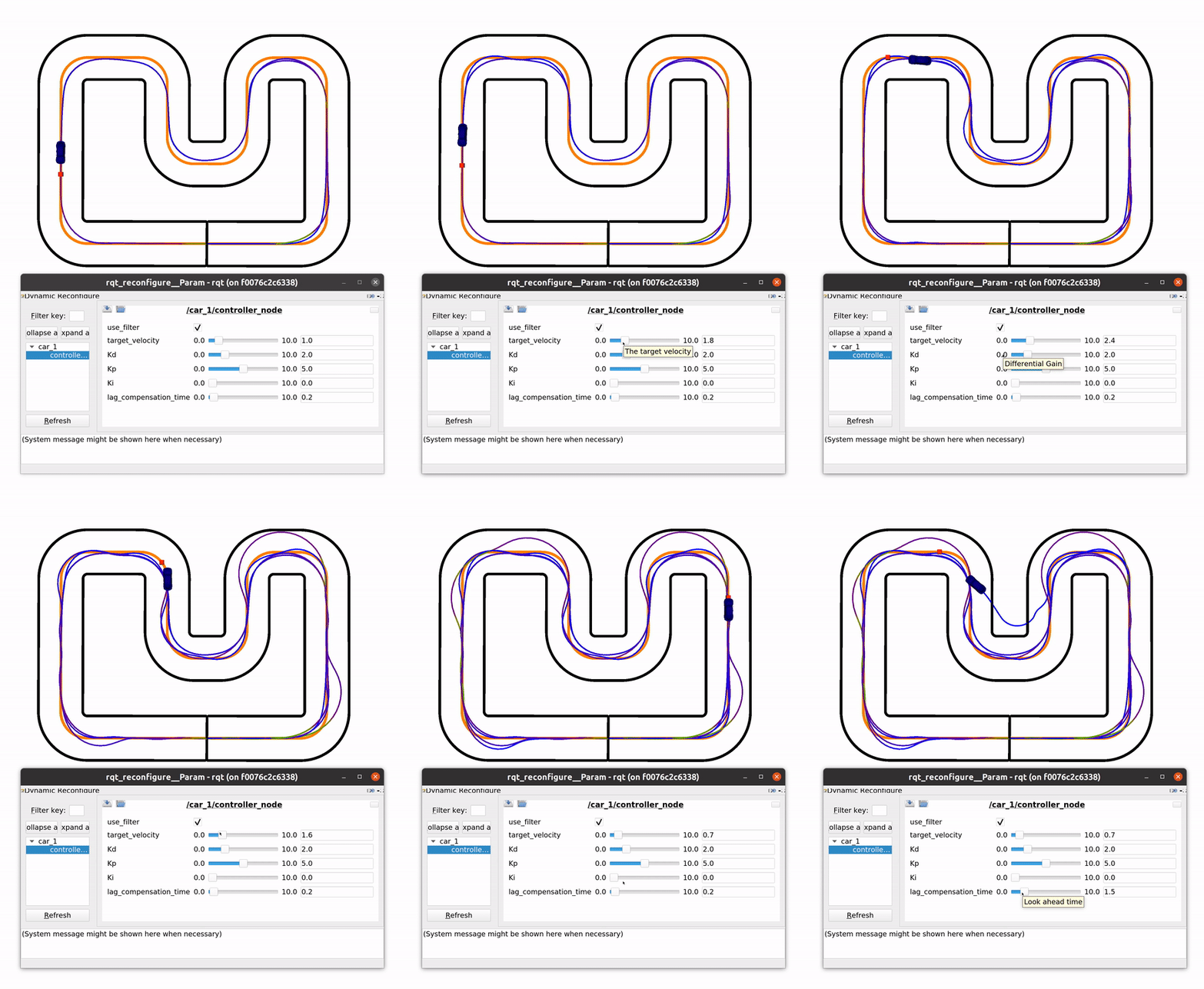
Many nodes support rqt_reconfigure to dynamically modify parameters of different components. To use it, perform the following:
- Run the CRS framework in a terminal
- Then, run rqt_reconfigure in another terminal.
Developer Guide
How to add your application to rqt_reconfigure
To add your own config to rqt_reconfigure:
- Create a reconfigure config that defines the UI. Create the .cfg object in
src/ros4crs/ros_controllers/cfg/<your_controller_type>.cfg. Here you need to define and expose all variables that should be tuned.
Example
#!/usr/bin/env python
PACKAGE = "ros_controllers"
from dynamic_reconfigure.parameter_generator_catkin import *

gen = ParameterGenerator()

gen.add("use_filter",    bool_t,    0, "Filter steering input", True)
gen.add("target_velocity", double_t, 0, "The target velocity",    1, 0,   10)
gen.add("Kd", double_t, 0, "Differential Gain",   2.0, 0,   10)
gen.add("Kp", double_t, 0, "Proportional Gain",    5.0, 0,   10)
gen.add("Ki", double_t, 0, "Integrator Gain",    0.0, 0,   10)
gen.add("lag_compensation_time", double_t, 0, "Look ahead time",    0.2, 0,   10)

exit(gen.generate(PACKAGE, "pid_config", "PID"))
- Create a .setConfig() function in your controller that allows to update the controller parameters.
Example
void PacejkaPIDController::setConfig(pid_config config)
{
  // Check if filter values have changed. If yes, create new filter
  bool filterChanged = config.use_filter != config_.use_filter;
  filterChanged = filterChanged || config.a_filter != config_.a_filter;
  filterChanged = filterChanged || config.b_filter != config_.b_filter;

  if (filterChanged)
  {
    u_steer_filter_ = Filter(config.b_filter, config.a_filter);
  }
  // Update config
  config_ = config;
};
- Create a DynamicReconfigureServer which has three variables: A dynamic_reconfigure server, a dynamic_reconfigure callback and a reference to your controller. You can have a look at the examples here:
src/ros4crs/ros_controllers/src/dynamic_config.cpp. Most importantly, you will need to overwrite thecallbackfunction which takes in the config from the UI and copies the parameter to the controller using thesetConfigfunction.
Example
DynamicPIDConfigServer::DynamicPIDConfigServer(std::shared_ptr<crs_controls::PacejkaPIDController> controller)
  : controller_(controller)
{
  f = boost::bind(&DynamicPIDConfigServer::callback, this, _1, _2);
  server.setCallback(f);
};

void DynamicPIDConfigServer::callback(ros_controllers::PIDConfig& config, uint32_t level)
{
  if (!controller_)
    return;
  if (!ignored_first_call)
  {  // Ignore first call. This lets us set default values using the parameter server and not the .cfg file
    ignored_first_call = true;
    return;
  }

  crs_controls::pid_config pid_cfg = controller_->getConfig();
  pid_cfg.Kd = config.Kd;
  pid_cfg.Kp = config.Kp;
  pid_cfg.Ki = config.Ki;
  pid_cfg.use_filter = config.use_filter;
  pid_cfg.target_velocity = config.target_velocity;
  pid_cfg.lag_compensation_time = config.lag_compensation_time;
  controller_->setConfig(pid_cfg);
};
- Make sure your DynamicConfigServer is registered in the component registry.
To do this, you can update the
get*Controller(..., void*& dynamic_callback_allocator)function. Make sure to have thedynamic_callback_allocatorpointer pointing to an instance of your DynamicConfigServer.
Example
DynamicPIDConfigServer::DynamicPIDConfigServer(std::shared_ptr<crs_controls::PacejkaPIDController> controller)
  : controller_(controller)
{
  f = boost::bind(&DynamicPIDConfigServer::callback, this, _1, _2);
  server.setCallback(f);
};

inline pacejka_ros_controller* getPacejkaPidController(ros::NodeHandle& nh, ros::NodeHandle& nh_private,
                                                       void*& dynamic_callback_allocator)
{
...
 dynamic_callback_allocator = (void*)new ros_controllers::DynamicPacejkaMPCCConfigServer(ptr);
....
}